
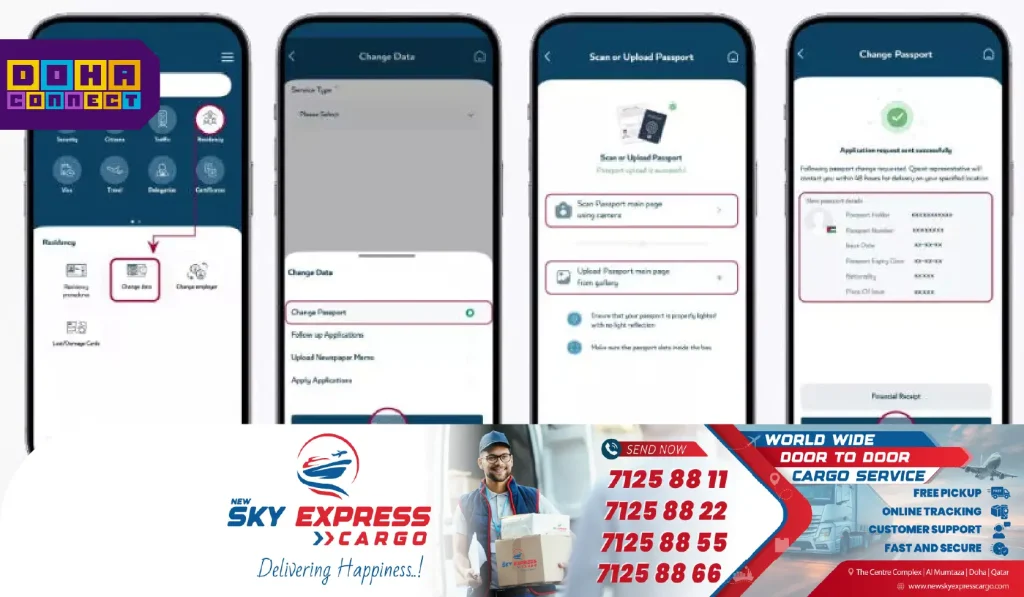
The Metrash app has been updated with new features to help residents and visitors to Qatar. The app offers new features that make it easier to renew passports, replace lost passports, and obtain a new Qatar ID (QID).
- To use the new service, open the Metrash app and go to the Residency section.
- Then, select ‘Change Data’ and click on ‘Change Passport’.
- You will be asked to enter your QID number.
- Next, scan the front page of your new passport and upload it.
- Make sure the passport details are clear and match what is shown in the app.
- Once the upload is complete, pay the required fee.
- After that, you can generate a new QID card with your updated passport information.
- The QID will be delivered to your home via Qatar Post.
The Ministry of Interior has advised everyone to update their passport details as soon as possible. It is also important to renew your QID on time to avoid any issues.
